
What is Test Editor? Creating French Exercises and Flashcards
Comprehensive overview of Test Editor, the tool for creating and designing interactive French exercises and memory cards (flashcards).
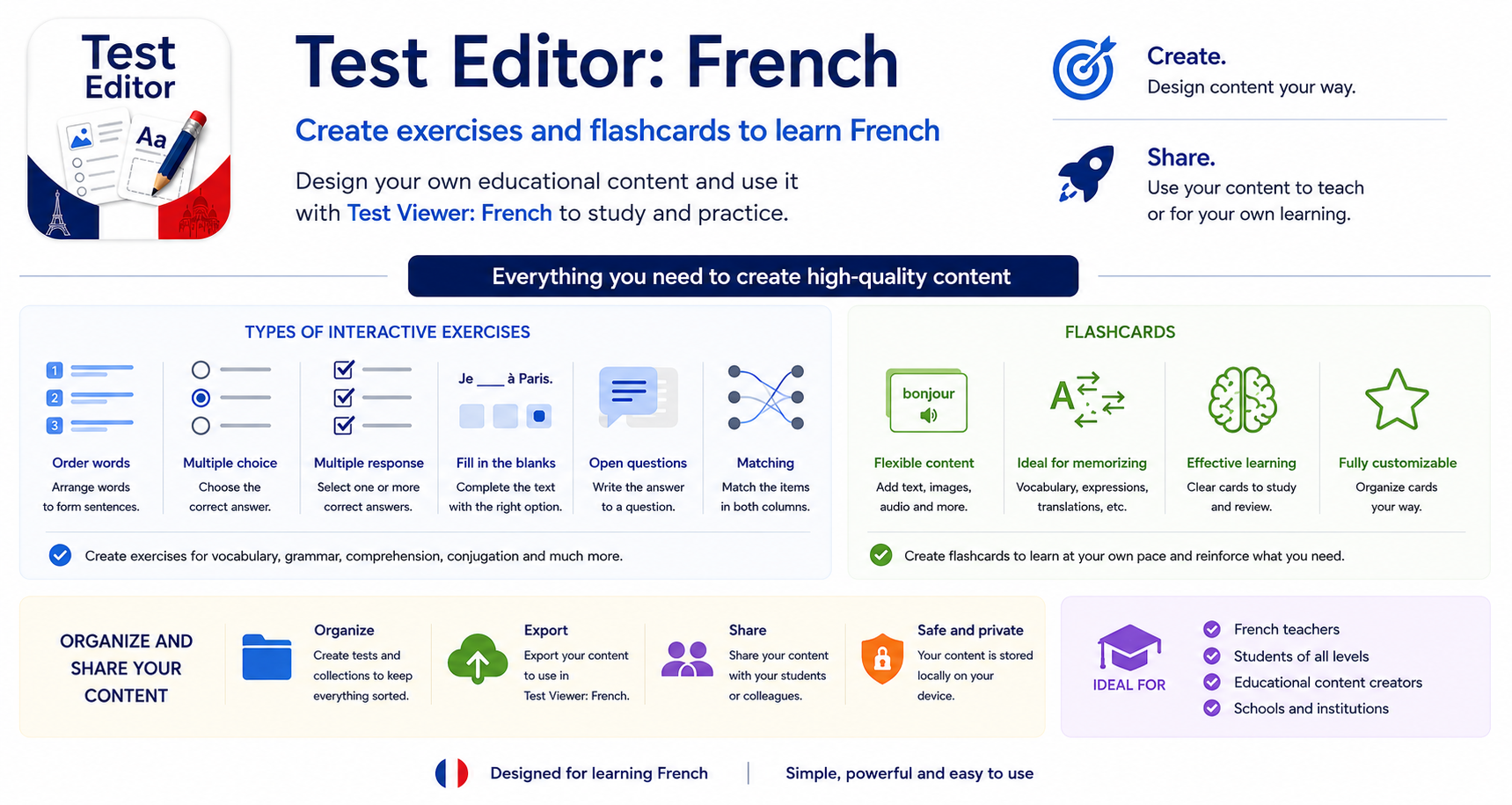
Test Editor is a free application designed to create, customize, and manage interactive questionnaires, exams, and French memory cards (flashcards). It is part of the LekuSoft educational ecosystem alongside Test Viewer, enabling teachers and students to produce their own custom-tailored learning materials.
With Test Editor, you can design exercises featuring audio, video, and images, compose explanations using Markdown formatting, organize flashcard decks with text-to-speech pronunciation, and structure all your study resources for subsequent use in Test Viewer.
Summary of Test Viewer Features
To understand the role of Test Editor, it is essential to look at Test Viewer, the companion application where all created content is practiced and experienced:
- Interactive Exercise Viewer: Allows students to complete dynamic questionnaires adapted to all CEFR levels (A1 to C2).
- Instant Feedback and Learning: Students immediately see whether an answer is correct, check hints, and review comprehensive explanations to learn from their mistakes.
- Flashcard Study (SRS): Built-in Spaced Repetition System algorithm. Students grade each card as Easy or Hard, optimizing review intervals to retain vocabulary over the long term.
- Multimedia Experience: Plays native audio recordings, listening tracks (écoute), images, and reference videos directly within tests.
- Gamification and Tracking: Students earn experience points (XP), organize materials into folders, and sync exercises from LekuSoft repositories or public Google Drive folders.
For complete details on the viewer, see the Test Viewer complete tutorial or the guide What is Test Viewer?.
Test Editor and Test Viewer: The Perfect Pair
Both applications operate in close harmony, dividing the learning workflow into two complementary stages:
- Test Editor (Creation & Authoring): Teachers or students design questions, write prompts, link multimedia files, or import vocabulary lists from spreadsheets.
- Test Viewer (Practice & Study): Learners open the created questionnaires or flashcard decks to solve them, self-assess, and review at optimal intervals.
┌────────────────────────┐         ┌────────────────────────┐
│      Test Editor       │         │      Test Viewer       │
│  • Create quizzes      │ ──────> │  • Take exercises      │
│  • Create flashcards   │         │  • Review with SRS     │
│  • Import Excel/CSV    │         │  • XP points & scores  │
└────────────────────────┘         └────────────────────────┘
Key Features of Test Editor
1. Seven Configurable Exercise Types
Test Editor enables the creation of a wide variety of question formats targeting different language skills:
- Fill in the Blanks: Supports typed written answers (with up to 4 blanks represented by
___) or multiple-choice dropdown selections (up to 2 blanks). - Multiple Choice: Classic question layout with multiple options and a single correct answer.
- Multiple Answer: Questionnaire item where more than one option, all, or none may be valid.
- Matching Columns: Pairing concepts from the left column with the right column (up to 6 simultaneous pairs).
- Ordering Elements: Scrambled words or phrases that students reconstruct in the correct sequence.
- Open-ended Questions: Free-text writing questions.
- Information (Study Cards): Informational cards without questions (to include audio transcripts, conjugation tables, or grammar notes). They feature:
- Rich Markdown formatting and real-time preview.
- Export and sharing in PDF format.
- Configuration as a meta-question to share a single audio or video file across multiple questions without duplicating files or restarting playback.
Check the detailed guide in Exercise Configuration.
2. Integrated Multimedia Resources
Any question can incorporate images, audio tracks, or videos (both local files stored on the device and links to platforms like YouTube), essential for French listening comprehension practice.
3. Advanced Flashcard Deck Editor
- Simultaneous display of Front and Back.
- Text-to-Speech (TTS) Tagging: Select words or phrases to have the app automatically generate native audio pronunciation.
- Reversible Cards: Practice either front-to-back or back-to-front.
- SRS Configuration: Customize review intervals (number of days between sessions).
More details can be found in the Memory Cards (Flashcards) guide.
4. Bulk Import from Spreadsheets (Excel and CSV)
Instead of adding cards one by one, Test Editor lets you import complete decks from an Excel (.xlsx) or comma-separated (.csv) spreadsheet with Front, Back, Hint, and Hint Back columns.
5. Author Protection and Intellectual Property
Authors can password-protect their tests and decks with a security lock, preventing unauthorized changes when sharing with students or colleagues.
6. Organization and Sharing System
- Classification according to the Common European Framework of Reference for Languages (CEFR: A1, A2, B1, B2, C1, C2).
- Hierarchical organization using a folder and subfolder structure.
- Options to share questionnaires by email, store them on local device storage, or distribute them via Google Drive.
Who is Test Editor for?
- French Teachers: To design custom activities tailored to their classes, build bespoke exams, and prepare study materials with pronunciation audio.
- Students and Self-Learners: To build their own vocabulary decks with new terms discovered in readings or videos, solidifying them through spaced repetition.
Where is it available?
Test Editor is completely free and accessible in two ways:
- iOS and Web version: available in any modern web browser on PCs, laptops, tablets, and Apple devices.
- Android version on Google Play Store: native app for Android tablets and smartphones.